


Last month my cousin sent me a WhatsApp photo and asked, honestly, bro, is this girl real or did a computer cook her up in ten seconds flat? I stared, zoomed, stared again. That is where this hunt for the best AI photo generator tools for realistic portraits actually started for me.
A portrait is not a product shot, na. One wrong reflection in the pupil and your brain screams fake before you even know why it did that. I have generated maybe 400 faces this year for clients, friends, random experiments. Half went straight to the bin, no mercy from me.
Below is what is left after all that binning, eight tools, tested with the same three prompts, including one grumpy old man with a grey beard. I paid for some, borrowed a friend’s login for one, won’t say which. Rankings are mine, argue with me in the comments, please.
What Makes a Portrait Look Real, Anyway?
Real skin misbehaves, thank God for that. Uncle Javed, 68, has a mole near his left ear, sun spots, and one tooth slightly darker than its neighbours, the whole beautiful mess. Tools that iron faces flat like bedsheets lose me in five seconds, every single time, guaranteed.
Light behaves badly in real rooms too, it bounces off a yellow wall and tints half a face orange, ask any wedding photographer in Karachi about June sunlight. The good tools copy that mess instead of cleaning it. The bad ones give everyone studio-perfect, hospital-clean, totally dead light.
1. Midjourney
Midjourney v7 made the prettiest failure of my whole test, a girl near a rainy bus window, tears, freckles, everything, except she had, I counted twice, six fingers holding her cup. When it behaves though? Nothing touches it. Portraits look like film stills your favourite director forgot to release.
It will cost you, though. Ten dollars gets a toe in, thirty is where normal humans actually live, and there is no free trial, which in 2026 feels almost rude of them. Stealth mode hides client work on higher plans. I pay it, grumble monthly, then forgive it instantly.
2. FLUX
I kept reopening one file, flux_fisher_09.png, all week. FLUX 1.1 Pro, quiet nerd of this race, beat the popular tools on skin without trying hard, which annoyed me. My prompt said fisherwoman, 52, cracked lips, salt in her hair. It kept every crack. Midjourney tried to beautify her. FLUX just… let her be tired.
You will not find a friendly FLUX app waiting for you, it is mostly API calls and partner websites, four to six cents a picture last I checked in October. Schnell, the free open one, runs at home if your graphics card does not cry. Mine did. Twice, loudly, poor thing.
3. Leonardo AI for Beginners Who Hate Discord
At my Saturday workshops, beginners start on Leonardo, full stop. Its dashboard has big friendly buttons, nobody has cried over it yet, unlike Discord, where two students quit last winter and I still feel guilty. PhotoReal mode, tick, prompt, generate, done. My student Fatima made her first sellable headshot in eleven minutes, first try, no Discord nonsense.
Free tokens land daily, 150 or so, enough rope to practise without burning rent money on curiosity, which I respect a lot. Paid starts near twelve dollars. One trap: Alchemy mode sounds magical, looks plastic. Fatima learned that, I learned that, you will probably ignore us and learn too.
4. DALL-E 3 and ChatGPT
ChatGPT‘s image tool, DALL-E 3 under the old name most people still use, is stupidly easy, and I mean that as praise on a lazy Sunday. You chat. It draws. I would type rubbish like blazer navy please, not black, sorry, and it fixed the jacket like a junior designer desperate for a permanent job.
Is it the sharpest tool here? Arre, no, yaar. Zoom in and faces go soap-opera soft, as if everyone slept nine hours and lives on green juice, which no client of mine does. But for a LinkedIn photo needed in twenty minutes before a job application deadline? My whole office used it. Twice this month alone.
5. Ideogram
Ideogram 3.0 does the trick that made me sit up at 1 a.m. like an idiot: text that actually reads correctly inside the image itself. A portrait holding a board saying SALE ENDS FRIDAY, spelled right, all three words. Others gave me SNERL ENFS FRODAY. I laughed, then I switched.
There is a free tier, roughly ten slow generations a week, and paid kicks off near seven, eight dollars depending on where you read it this week. Portraits themselves? Good, not great. Slightly waxy ears, sometimes. But posters, thumbnails, shop banners with a face plus words, nobody else is even close.
6. Stable Diffusion
Stable Diffusion, SDXL and its endless community models, is the toolbox under my stairs: messy, free, and somehow always containing the exact weird thing I need today. Face models trained by hobbyists beat paid sites on certain skin tones. No daily cap. No uncle in California approving your prompt either.
Now, the bad part, and my laptop still holds a grudge: installing it ate my whole Friday, drivers, Python errors, a model file bigger than my wedding album collection. Beginners, run away, seriously. Patient tinkerers, though? After week one you will wonder why anyone pays monthly for portraits at all.
7. Adobe Firefly
Adobe Firefly is what I open when a client says the word legal, because that word ends all fun arguments instantly in any office meeting anywhere. Trained on licensed stock, indemnified for business use, sitting inside Photoshop where I already live half my working day. Boring? Yes. Safe? Also yes, completely.
Its portraits lean clean, corporate, everybody well-rested, which suits annual reports and murders street photography vibes completely dead, pick your poison wisely before you start generating anything. Free credits vanish fast, 25 went in one afternoon for me. Photoshop subscribers, check your account, you probably already own this and forgot.
8. Imagen by Google
Google’s Imagen, hiding inside Gemini where half my friends have not even noticed it yet, shocked me with brown skin that stayed brown, not orange, not grey, finally. Sounds small. Try five other tools with a Sri Lankan bride prompt at golden hour, then come back here and thank me.
Getting in depends on your plan and, annoyingly, your country, a sentence I type about Google products far too often these days, honestly it is getting old now. Once you are in, which took me three tries on a borrowed account in August, it runs quick, prompts stay short, and daylight portraits look like phone photos from a holiday.
Prompt Tips From My Paper Notebook
Rule three in my paper notebook, coffee stain on page nine and all, says brief your photographer like a human outside a cafe, not a poet at midnight. Age first. Then scar, light direction, shirt colour, background mess. Dreamy vibes bought me a mannequin in March. Specifics bought me a person.
Copy-paste this from my notebook if you want, half my workshop already has: slight skin shine, stray hairs escaping, one eye half shut against the sun. Imperfections are instructions, basically. I once removed every flaw from a prompt on purpose. Result looked like a wax statue wearing my uncle’s jacket at dinner.
So, Which One Gets Your Money?
Money tight this month? Leonardo free, Ideogram free, Stable Diffusion free if your PC survives it, that is your ladder, climb it in that order like I did last year. Money fine, patience zero? Midjourney, pay, prompt, download, go live your life. There is no fourth secret option hiding anywhere, I checked thoroughly.
Working for paying clients changes the maths completely, because a beautiful portrait you cannot legally sell is just expensive wallpaper for your hard drive at home. Firefly first, paid Midjourney second, and save every invoice. And never, ever fake a real person’s face for anything. That road ends badly, full stop, always.
Questions People Keep Asking Me
People ask me this one every week: which tool makes the most realistic portraits?
Most realistic? On my desk today it is FLUX for skin you can almost feel, Midjourney for faces with actual mood behind the eyes, screenshot this answer because next month both will update and humiliate it publicly. Run my fisherwoman prompt through both tools. Your eyes will pick your winner quickly.
Related article: Best AI Tools for Image to Video Animation – img Best AI Video Creation Tools
Are these tools free to use?
Free or not? Leonardo, Ideogram and Stable Diffusion let you start for zero rupees, which is the correct price for learning anything new on the internet these days. Paid plans across this list sit between seven and thirty dollars monthly. What you are buying is speed, privacy and selling rights, mostly, honestly.
Can I use AI portraits for my business?
Business use? Mostly yes on paid plans, I sell portraits made this way, but the terms page of your plan beats any blog, including this one, in a fair fight. Firefly if the client is big and nervous. And label AI portraits honestly, customers forgive AI quickly, they do not forgive lying at all.
Transform Simple Prompts Into Realistic AI Images
Two years back I could spot an AI face from across a room, usually by the earrings melting into someone’s neck like warm cheese at a barbecue party.
Never judge a tool on one generation, that is like judging a restaurant because the first roti came out burnt on a busy Friday night in town. Run four, minimum.
Copy prompt:
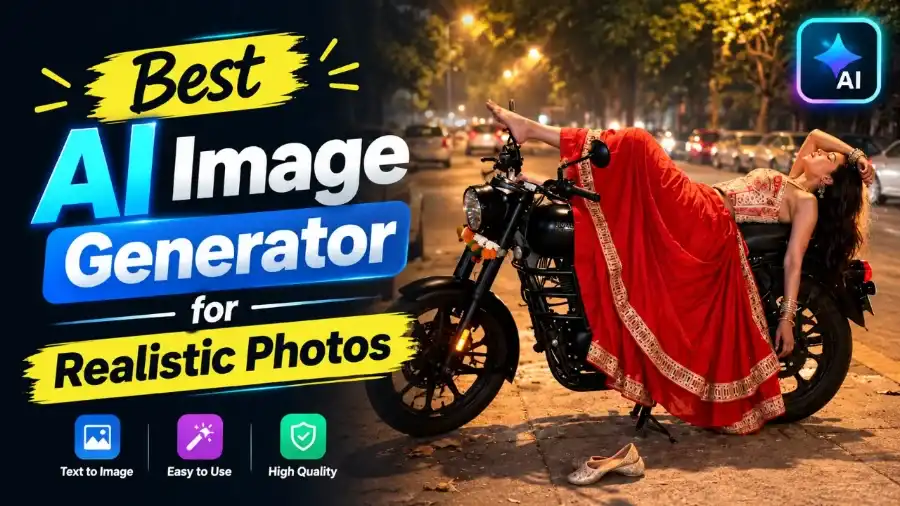
Create cinematic smartphone-click close-up photograph of a woman reclining her back dramatically across a black Royal Enfield cruiser motorcycle parked at a house gate at night. One hand is posed gracefully near her neck as she reclines across the bike's seat and fuel tank, her head tilted back and looking upward. She is wearing a white backless sleeveless blouse paired with a flared deep maroon, white, and blue check-square lehenga skirt. Stacked oxidized-silver bangles adorn her wrist. Night shot, ultra-realistic details, 8K resolution, vertical 3:4 ratio.
Save the seed number of any face you like, change one detail, run again. My students groaned at that, then messaged before dinner: it worked first go.
| AI Photo Generator |
|---|
| AI Fashion Photo |
| Get More Photo Prompts |
Now? My photographer friend got fooled twice in my own test folder this week. Twice. Love it or hate it, that future sits in our pockets already, asking nobody’s permission.
So stop what I did in March, eight apps open, hopping nightly, 200 faces deleted, headache earned. Pick one tool. Give it this weekend properly, break it, learn its moods like a new camera. The best AI photo generator tools for realistic portraits reward stubborn people in the end. Your first believable face is closer than you think.